
Short answer: a ghost mannequin photo shows a garment in its worn, 3D shape with a hollow neckline and no model or mannequin visible. The classic way is to shoot on a mannequin and remove it in editing. The quick way is to make it with AI from a flat lay or hanger photo, then check it against the real garment.
Before and after
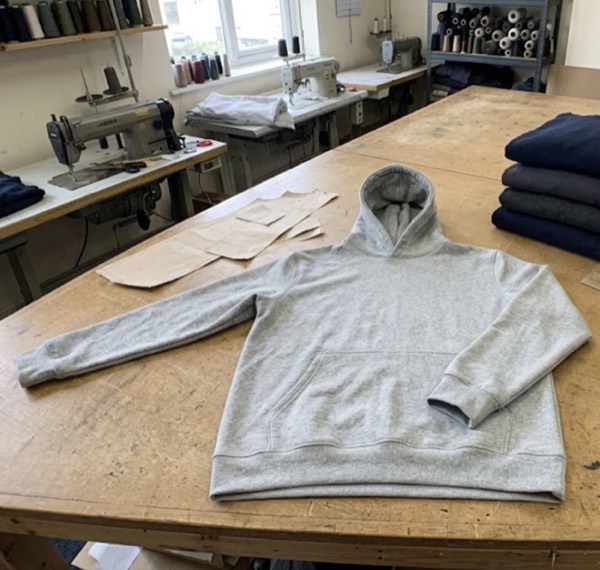
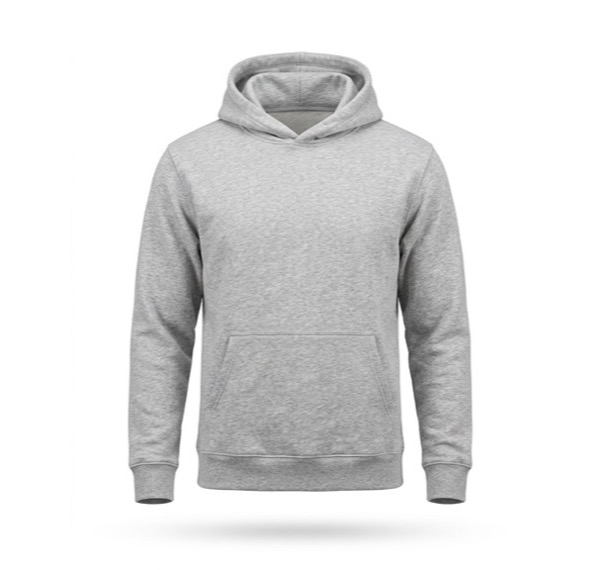
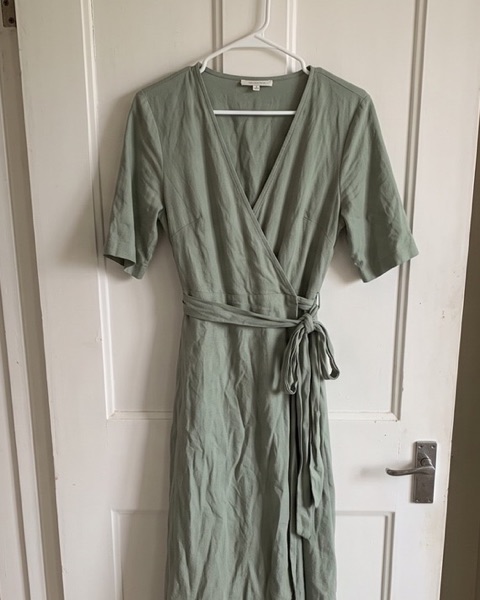
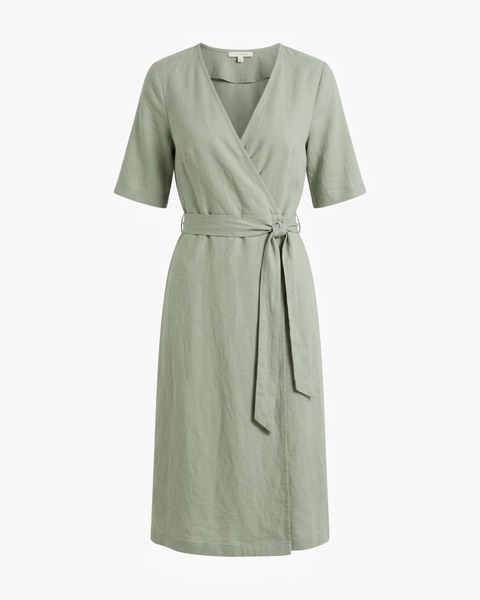
Both garments kept their details: the hoodie’s pocket, cuffs and ribbed hem, and the dress’s plain sleeves, wrap edge and side tie.
Why shops use it
- Shows fit and shape. Buyers see how the shoulders, neckline and length sit, which a flat lay can’t show.
- Keeps attention on the garment. No face, pose or styling to distract, and nothing that dates the photo.
- Looks consistent. Every product in the same pose on the same background makes a tidy shop grid and collection page.
- Works on marketplaces. A clean shot on white suits main images on Amazon, Etsy and Shopify.
Three ways to make a ghost mannequin photo
| Method | What you need | Good for |
|---|---|---|
| Mannequin + editing | A mannequin with a removable neck and chest, a camera, and Photoshop skills: shoot the front and the inside back, then blend them | Brands shooting many items the same way |
| Editing service | Your mannequin photos, sent to a retouching service that removes the mannequin for a fee per image | Shops with a mannequin but no time to edit |
| AI from a flat photo | One flat lay or hanger photo; the AI builds the worn shape and hollow neck | Small shops with no mannequin or studio |
How to shoot the photo for an AI ghost mannequin
- Smooth the garment out. Steam or iron big creases; small natural folds are fine.
- Show all of it. Lay it flat or hang it so the neckline, both sleeves and the hem are in the photo.
- Use daylight. Near a window, no flash, so the colour comes out true.
- Tie and fasten it the way you want it shown. A belt, tie or zip is kept as it is in the photo.
- Shoot straight on from the front, from above for a flat lay.
Check every AI result
AI is quick but not perfect. In our first tests one prompt added turned-up cuffs and a curved hem to a dress that had neither, so we changed it. Before you use an image, compare it with the real garment: colour, neckline, sleeve length, cuffs, hem, pockets, prints and labels. Keep only the images that match, and make another try for the rest. Marketplaces expect photos to show the item the buyer gets.
Ghost mannequin or flat lay?
Use a ghost mannequin shot as the main image when fit matters: tops, hoodies, jackets, dresses. Use a flat lay for a styled scene or for folded items, and an on-model image to show how it looks worn. Then size each one for its platform with the free photo resizer.
Questions sellers ask
What is ghost mannequin photography?
A way of showing clothing in its worn shape without a visible model or mannequin. The neckline is hollow, so you see the inside back of the garment, and the shoulders, chest and sleeves have natural volume. It is also called invisible mannequin photography.
Is ghost mannequin better than a flat lay?
It shows fit and shape better, which helps for tops, jackets and dresses. A flat lay is quicker and suits folded or styled shots. Many shops use a ghost mannequin shot as the main image and flat lays or on-model images after it.
Can AI make a ghost mannequin photo?
Yes. SnapStudioAI makes one from a flat lay or a photo on a hanger. Check each result against the real garment: in our tests AI sometimes added details, like cuffs, that the garment did not have. Keep only the images that match.
Which clothes work best?
Tops, T-shirts, hoodies, knitwear, jackets and dresses. Trousers and skirts can need a few tries. Start with a photo of the whole garment, smoothed out, in daylight.
Can I use ghost mannequin photos on Amazon, Etsy or Shopify?
Yes, as long as the photo shows the real item unchanged. Ghost mannequin shots on white are a common choice for clothing main images.